
Developer Licence
More actions
| Jobs |
|---|
 |
| Licences |
| Trades |
| Professions |
| Government jobs |
| Category |
A developer licence allows you to create leasehold subregions for freehold regions. This is useful for when you are trying to create:
- Apartments
- Market Stalls
- Stores
- Offices
- ...and any other rentable spaces!
Creating these subregions only require you to select the space and run one simple command!
Subregion Wand
- Grab a wand, run
/realty subregion wand - Select your area by right clicking all the corners with your wand
- Run
/realty subregion confirm, set your height, price, max extensions etc.
Leasing Updates
Landlords can no longer instantly change the rent on existing tenant. Instead they must propose a modification like so:
/realty modify <price/duration/maxextensions> <value>
The new terms apply the next time the tenant extends their lease, and the tenant can simply decline by not renewing, letting the lease end naturally.
Tenants can now propose changes too.
- Run
/realty modify <price/duration/maxextensions> <value>as the tenant - Your landlord sees all modification requests via
/realty modify inbox - Your landlord reviews it with
/realty modify accept <region>or/realty modify reject <region> - Check your own pending proposals any time with
/realty modify outbox
Either party can end a lease early, but it now honours a mandatory notice period of 3 days.
Landlords can run: /realty terminate <region>
The lease ends after the notice window, with prorated refunds issued automatically. This is cancellable at any time with /realty terminate cancel <region>
You can now close a region to new tenants.
Done renting a place out? Stop it being rentable the moment it goes vacant:
/realty rentable false <region>
Selecting your Space
The shape of your proposed rental will determine how you select your subregion's space.
Cuboid (rectangle/square)
If you plan on having your rental be a rectangle or square, follow these steps.
- Place two blocks marking the corners of your space
- Run
//wandto grab a WorldEdit wand - LEFT CLICK your first corner corner with your wand
- RIGHT CLICK your second corner with your wand
You should now see a preview of your selection using little fire particles, confirm that is the correct selection.
If it is incorrect, you can run the command //sel and repeat Steps 1 to 4 again.
Now you are ready to run the subregion command, see the Subregion Command section.

Polygon
If you plan on having your rental NOT be rectangle or square, follow these steps.
- Place blocks marking each corner of your space
- Run
//wandto grab a WorldEdit wand - Run
//sel polyto change to Polygon mode - LEFT CLICK your first corner with your wand
- RIGHT CLICK your every other corner with your wand
- RIGHT CLICK your first corner again to seal your selection (IMPORTANT! YOU CANNOT SKIP THIS STEP!)
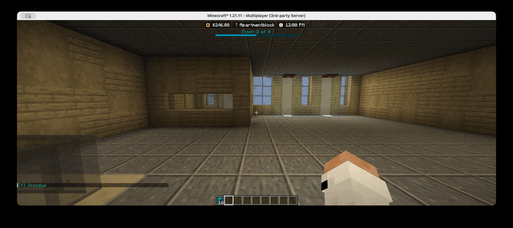
A player creating a polygon selection in-game. Click if video isnt playing!

Subregion Command
/realty subregion quickcreate <parentRegion> <name> <price> <duration>
Each argument is explained below
- <parentRegion> - This is the region that your rental is inside of. You can only have one parent. e.g. c100
- <name> - This is the name of your new rental. e.g. cool-apt-1
- <price> - This is the dollar price of your rental, do not include any currency sign. e.g. 100.25
- <duration> - This is the duration of your lease period. e.g. 30d
- For duration, you can use the following suffixes: `s (seconds), m (minutes), h (hours), d (days), w (weeks)`
Example: /realty subregion quickcreate c100 cool-apt-1 100.25 30d
- This creates a new subregion inside c100 called cool-apt-1, which you can pay $100.25 every 30 days to lease (rent)
Additional Information
- Your subregion cannot have more than one parent. In such cases, ask a Staff member to region for you
- You can only create LEASEHOLD subregions
- You cannot overlap with other subregions
- The landlord is automatically set to you
- Subregions must have meet the minimum size of 20 BLOCKS
- Resizing, changing landlord, price, or duration requires a Staff member
- You can clear your selection any time by running
//sel - To go back to Cuboid mode, run
//sel cuboid