
More actions
Technofied (talk | contribs) m Tweaks to formatting |
Technofied (talk | contribs) No longer need to migrate old areashop claims, as they should not exist anymore! |
||
| (2 intermediate revisions by 2 users not shown) | |||
| Line 7: | Line 7: | ||
[[File:Create a Claim in Claims Menu.png|thumb|496x496px|Click '''Create a Claim''' in order to create your claim!]] | [[File:Create a Claim in Claims Menu.png|thumb|496x496px|Click '''Create a Claim''' in order to create your claim!]] | ||
== How to | == How to create a claim == | ||
# Travel to the Wilderness (<code>/airport</code>) | # Travel to the Wilderness (<code>/airport</code>) | ||
# Find a piece of land that you would like to claim | # Find a piece of land that you would like to claim | ||
# Run <code>/claim</code> and select '''Create a Claim!''' | # Run <code>/claim</code> and select '''Create a Claim!''' | ||
You can add people to your claims and more in the <code>/claim</code> menu! | You can add people to your claims and more in the <code>/claim</code> menu! | ||
* You can also '''buy more claim blocks in the same menu!''' | * You can also '''buy more claim blocks in the same menu!''' | ||
== How to expand a claim == | == How to expand a claim == | ||
# Grab a claim wand via <code>/claimwand</code>! '''NOTE:''' You can only claim one wand per day, so don't misplace this wand! '''Any golden shovel will act as a wand however.''' | # Grab a claim wand via <code>/claimwand</code>! '''NOTE:''' You can only claim one wand per day, so don't misplace this wand! '''Any golden shovel will act as a wand however.''' | ||
# <code>'''RIGHT CLICK'''</code> with the claim wand '''anywhere inside''' your claim, you will then see '''a glowstone and gold block perimeter.'''[[File:Example selected Wilderness Claim.png|border|center|thumb|500x500px|You can now see your wilderness claim borders, the '''corners are represented by glowstone!''']] | # <code>'''RIGHT CLICK'''</code> with the claim wand '''anywhere inside''' your claim, you will then see '''a glowstone and gold block perimeter.'''[[File:Example selected Wilderness Claim.png|border|center|thumb|500x500px|You can now see your wilderness claim borders, the '''corners are represented by glowstone!''']] | ||
# <code>'''RIGHT CLICK'''</code> with the claim wand '''any <u>corner</u>''' ('''NOT''' edge!) of your claim to select your corner.[[File:Example corner of a Wilderness region selected.png|border|center|thumb|500x500px|The glowstone has now '''disappeared since you selected it - this is normal!''']] | # <code>'''RIGHT CLICK'''</code> with the claim wand '''any <u>corner</u>''' ('''NOT''' edge!) of your claim to select your corner.[[File:Example corner of a Wilderness region selected.png|border|center|thumb|500x500px|The glowstone has now '''disappeared since you selected it - this is normal!''']] | ||
| Line 29: | Line 27: | ||
* '''Don't have enough claim blocks?''' Buy more from '''<code>/claim</code>'''! | * '''Don't have enough claim blocks?''' Buy more from '''<code>/claim</code>'''! | ||
Latest revision as of 12:33, 18 January 2026
DemocracyCraft utilises a simple self-service claiming system for claiming up to 4,096 blocks in the Wilderness!
- Each block costs $10, and can be bought as you acquire the funds
- You start out with 10 free blocks (very generous we know)
- You can only claim in the Wilderness, not the Everwild!

How to create a claim
- Travel to the Wilderness (
/airport) - Find a piece of land that you would like to claim
- Run
/claimand select Create a Claim!
You can add people to your claims and more in the /claim menu!
- You can also buy more claim blocks in the same menu!
How to expand a claim
- Grab a claim wand via
/claimwand! NOTE: You can only claim one wand per day, so don't misplace this wand! Any golden shovel will act as a wand however. RIGHT CLICKwith the claim wand anywhere inside your claim, you will then see a glowstone and gold block perimeter.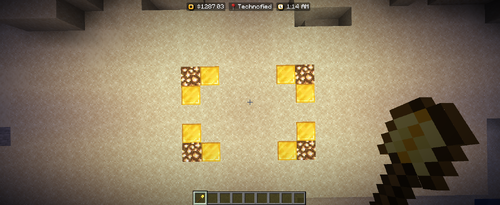
You can now see your wilderness claim borders, the corners are represented by glowstone! RIGHT CLICKwith the claim wand any corner (NOT edge!) of your claim to select your corner.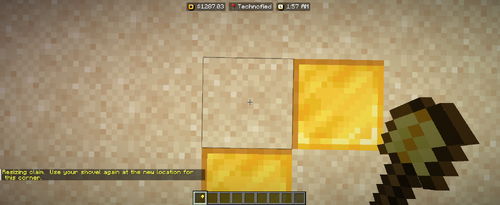
The glowstone has now disappeared since you selected it - this is normal! RIGHT CLICKthe new position for your corner. If you have enough claim blocks, your claim will automatically resize!


- Don't have enough claim blocks? Buy more from
/claim!